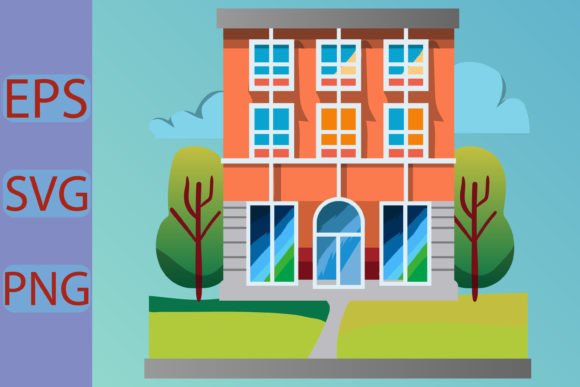
School Building Vector Illustration
If you're designing for education, nostalgia, or youth culture — whether it's a back-to-school campaign, a teacher appreciation gift, or a Gen Z–friendly apparel line — a School Building Vector Illustration isn’t just decoration. It’s a flexible visual anchor that communicates familiarity, structure, learning, and even playful rebellion — all at once.
This isn’t clipart. It’s a thoughtfully built, fully editable vector set: clean lines, intentional proportions, and layered architecture (classroom windows, clock towers, flagpoles, brick textures, arched doorways) — all separated into individual, scalable elements. Each part — roof, steps, signage, trees, even the “Hello This is the School building” banner — lives in its own layer. That means you’re not stuck with what you see in the preview. You can recolor the brickwork purple, shrink the bell tower to fit a mug handle, or delete the fence to simplify for a minimalist sticker sheet.
Where This Design Fits IRL — Not Just in Mockups
Think beyond “I need a school graphic.” Ask instead: Who’s seeing this, where, and why does it matter?
- Teachers & School Staff: Printing custom classroom posters, laminated hallway signs, or “Welcome Back!” banners for open house — no design degree required. Swap fonts, adjust colors to match school branding, scale up for bulletin boards or down for student name tags.
- Small-Batch Merch Sellers: Running an Etsy shop for back-to-school hoodies? A vector school building fits perfectly on chest prints, pocket patches, or sleeve accents — and stays razor-sharp whether it’s 2 inches wide on a toddler tee or 14 inches across a full-zip hoodie front. SVG + PNG + EPS means your printer, sublimation press, or DTG provider gets exactly what they need.
- Content Creators & Educators: Making printable study planners, digital flashcards, or Canva-based lesson slides? Drop the vector onto a worksheet background, overlay it with animated text in Keynote, or use the transparent PNG for Instagram carousels about “first-day routines.” The 4500×5400 px PNG ensures crisp rendering even on large-format social posts.
- Scrapbookers & DIY Crafters: Cutting machines (Cricut, Silhouette) love SVGs. Use the school building as a cut-out for memory books, layered vinyl decals for lockers, or foil-embossed journal covers. Since every element is separate, you can cut just the clock tower for a subtle accent — or the whole façade for a bold centerpiece.
- Local Businesses Near Campuses: A coffee shop launching a “Study Fuel” promo? A tutoring center redesigning their website hero section? This illustration adds instant context without clichés — no cartoon apples or chalkboards. It feels grounded, real, and quietly confident.
What Makes It Work for the “Trendy Generation” (Without Trying Too Hard)
It’s not about being flashy — it’s about being adaptable. Gen Z and younger millennials respond to authenticity, customization, and visual clarity. They scroll fast, value intentionality, and spot low-effort design instantly. A hand-drawn, slightly imperfect vector? Yes. A rigid, over-rendered 3D model? Less so.
This School Building Vector Illustration leans into that: clean but not sterile, structured but not stiff. The “Back to school Pro Vecto” styling nods to retro academic graphics (think 90s yearbooks or library card catalogs), while the modern file setup — SVG, print-ready 300 dpi, color-swappable layers — keeps it functional today. And because the text (“Hello This is the School building”) is live and editable, you’re not locked into one voice. Swap it for “Room 204”, “Alumni ’09”, or even a meme caption — all without opening Illustrator from scratch.
Before You Download: Practical Things to Keep in Mind
You’ll get everything in one ZIP — organized folders for SVG, PNG, EPS, and source files. But here’s what matters most in practice:
- Editing freedom ≠ zero learning curve: You don’t need Adobe Illustrator to use the PNGs (they work in Canva, PowerPoint, Photoshop), but to unlock full color control, layer separation, or true scalability, vector software helps. Don’t worry — basic edits (fill color, stroke weight, grouping) are intuitive in free tools like Inkscape or Affinity Designer.
- “Fully scalable” is true — but context still guides size: Yes, you can blow it up to billboard size without blur. But on a 3-inch sticker, tiny details (like individual bricks or window mullions) may vanish. Zoom out when testing for small applications — sometimes simplifying layers yourself yields cleaner results than auto-scaling.
- Print-ready doesn’t mean “press-ready out of the box”: The 300 dpi PNGs and CMYK-ready EPS files are production-safe, but always check with your vendor. Some screen printers prefer outlined fonts; some sublimation services ask for RGB. Your files give you that flexibility — you just decide based on the output method.
- Preview images aren’t included — and that’s intentional: What you see on-screen is a representation. The real value is in the editable, layered source. If you need a specific variation (e.g., “add graduation caps”, “make it look like a mid-century modern school”, “convert to line art only”), the creator offers free editing. That kind of collaboration beats hunting for “close enough” elsewhere.
Real Use, Real Flexibility, Real Results
A graphic designer used the clock tower element alone — recolored gold, flipped horizontally — as a subtle watermark on a district-wide staff newsletter. A college bookstore turned the full building into a die-cut vinyl decal for laptop sleeves, then reused the same SVG to animate a “campus tour” microsite. A homeschool parent printed the building (minus text) on kraft paper, cut it out by hand, and glued it onto a handmade reading log — the vector’s clean edges made tracing effortless.
That’s the quiet power of a well-built School Building Vector Illustration: it doesn’t shout. It serves. It adapts. It holds space for meaning — whether that’s tradition, transition, pride, or just the cozy certainty of a familiar place where learning happens.
So if you’re updating merch, supporting students, celebrating educators, or simply love design that works as hard as you do — download it. Tweak it. Print it. Stitch it. Stick it. And if the text needs adjusting, or the palette needs shifting? Just knock. Free editing isn’t a gimmick here — it’s how this asset stays useful, long after the first download.