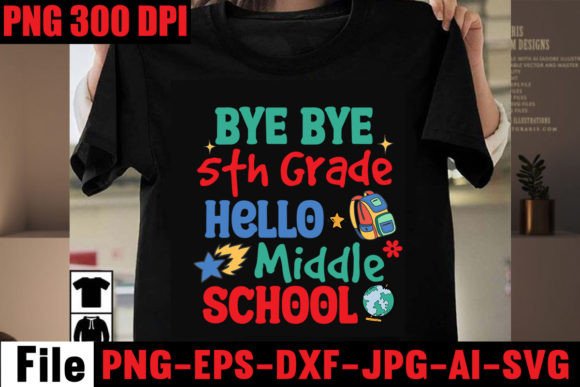
Bye Bye 5th Grade Hello Middle School: A Practical Digital Design Bundle for Real-Life Back-to-School Moments
“Bye Bye 5th Grade Hello Middle School” isn’t just a cheerful phrase—it’s a digital design bundle built for the emotional, logistical, and creative realities of transition. Whether you’re a parent snapping photos on the first day of middle school, a small-batch shirt maker prepping for back-to-school season, or a classroom teacher decorating their door with intention, this set meets you where you are—with clean, ready-to-use files that work across platforms and projects.
This is a DIGITAL DOWNLOAD ONLY resource: no physical item ships, no waiting, no inventory management. You get one .zip file containing five versatile formats—SVG, DXF, EPS, PNG (300 DPI, transparent background), and JPEG (mockup)—all designed to integrate smoothly into your existing workflow.
When and Where This Bundle Fits Naturally Into Real Life
Think about the moments when “Bye Bye 5th Grade Hello Middle School” lands with meaning—not as generic clipart, but as something personal and timely:
- A mom printing custom name tags and lunchbox labels the night before orientation, using the SVG in Cricut Design Space to cut vinyl decals for her child’s water bottle and notebook.
- A PTA volunteer designing a welcome banner for the school hallway—dragging the EPS file into Adobe Illustrator, scaling it without pixelation, and printing it on durable matte vinyl.
- A homeschooling dad creating a “transition journal” for his daughter: he layers the PNG over scrapbook paper in Silhouette Studio, adds handwritten notes, and prints a keepsake booklet she’ll open on graduation day.
- A local screen printer preparing limited-run tees for a sixth-grade cohort—importing the DXF into their RIP software, aligning it precisely on youth-sized blanks, and running a batch before the first bell rings.
It’s not about filling a cart or checking a trend box. It’s about having the right asset, in the right format, at the right time—so you spend less time troubleshooting file compatibility and more time celebrating growth.
Why Format Variety Matters More Than You Might Think
You don’t need all five files—but you *will* need the right one for your tool and task. Here’s how each format serves real-world needs:
- SVG: Your go-to for Cricut users who rely on layers, color separation, and weld functions—especially useful when cutting layered vinyl for shirts or wall decals.
- DXF: The reliable choice for Silhouette Studio users who prefer vector paths over grouped objects, especially when working with older versions or complex cut settings.
- EPS: Ideal for designers who need editable vector paths in Adobe Illustrator or Inkscape—think teachers modifying text size for bulletin boards or marketers adapting the phrase for branded newsletters.
- PNG (transparent, 300 DPI): Perfect for digital use—adding to Canva invitations, overlaying on social media posts, or inserting into Google Slides for student orientation presentations.
- JPEG mockup: Not just decorative—it helps you visualize placement and proportion before cutting or printing. Useful for approving designs with clients or previewing how a mug decal will look before ordering blanks.
No guessing whether your machine supports a format. No last-minute conversions that distort edges or drop layers. Everything works out of the box with Silhouette Studio, Cricut Design Space, Inkscape, Photoshop, and Illustrator.
Who Benefits—and How Their Needs Differ
A freelance graphic designer building a back-to-school product line uses the EPS and SVG to create consistent variations—changing fonts, adding icons, or swapping colors—without redrawing from scratch. They value precision and scalability.
A small business owner selling personalized mugs on Etsy downloads the PNG and JPEG to generate lifestyle mockups for listings—and uses the SVG to cut heat-transfer vinyl for physical orders. Speed and visual consistency matter most.
An elementary school counselor preparing a “moving up” ceremony might print the phrase on cardstock using the PNG, then laminate and hand them out as keepsakes. Simplicity and readability trump editing flexibility.
Even educators using free tools like Canva appreciate having a high-res PNG they can upload directly—no need to trace or recreate. It saves 10 minutes per project, and those minutes add up across lesson planning, bulletin board prep, and family communication.
What to Consider Before Downloading
This bundle shines when used intentionally—not as filler, but as functional design support. Ask yourself:
- Do I already own or regularly use a compatible cutting machine or design app? If you’ve never opened Silhouette Studio or Cricut Design Space, start with a free trial first. These files won’t do much sitting unopened in your Downloads folder.
- Is my goal personal, professional, or commercial? The files are licensed for both personal and small-business use—including printed products you sell—but not for mass redistribution or resale as standalone digital assets.
- Am I looking for customization—or plug-and-play simplicity? While the vector files are fully editable, the design itself is hand-lettered and intentional. You can resize, recolor, or reposition—but altering the wording (“Bye Bye 6th Grade…” etc.) requires vector editing skill.
- Do I have a clear next step? Knowing whether you’ll cut, print, or digitally share helps you pick the right file upfront—and avoid re-downloading or converting later.
If you run into trouble—say, a DXF doesn’t import cleanly into your version of Silhouette Studio—the seller offers direct support. That responsiveness matters when you’re on deadline and need clarity, not canned replies.
More Than a Phrase—A Thoughtful Touchpoint
“Bye Bye 5th Grade Hello Middle School” resonates because it names a specific, emotionally charged milestone—not just “back to school,” but a shift in identity, responsibility, and independence. That specificity makes it more than decoration. It becomes affirmation.
That’s why teachers use it on welcome signs that say, “We see you stepping up.” Why parents embroider it onto backpacks—not as a label, but as quiet encouragement. Why crafters pair it with subtle botanical accents or minimalist typography, letting the message breathe instead of shouting.
This bundle doesn’t solve every back-to-school challenge—but it removes friction from expressing what matters most: recognition, continuity, and care during change.