Teacher Tumbler Wrap Sublimation 2
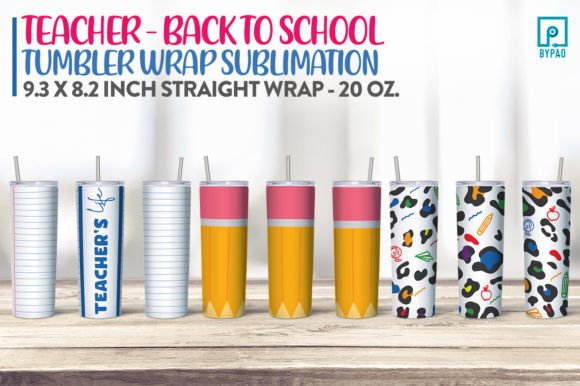
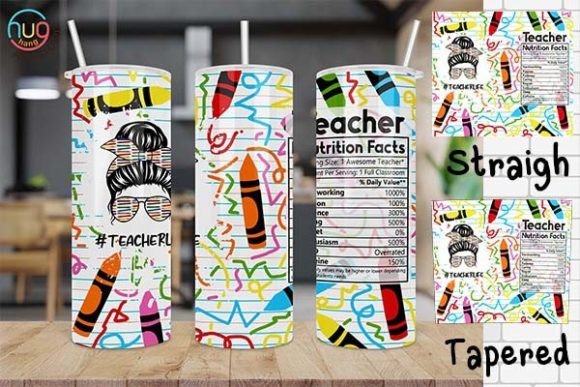
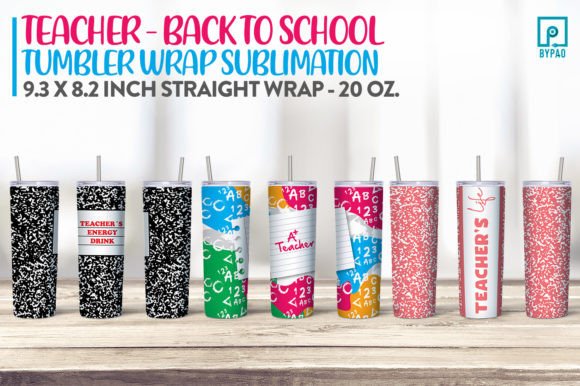
If you're crafting custom tumblers for teachers—whether for back-to-school gifts, classroom appreciation, or small-batch sales—you’ll want designs that print cleanly, scale predictably, and reflect professionalism without extra guesswork. Teacher Tumbler Wrap Sublimation 2 is a ready-to-use digital wrap set built specifically for 20 oz skinny tumblers, designed with real sublimation workflows in mind—not just aesthetics.
What sets this apart isn’t just the cheerful motifs or school-themed charm—it’s the intentional sizing, resolution, and file structure. You’ll receive a zip file with three high-resolution PNGs (300 DPI), each sized at approximately 9.3 × 8.2 inches. That dimension maps closely to the printable surface of most standard 20 oz skinny tumblers when wrapped around a sublimation-ready blank—no stretching, no awkward cropping, and no last-minute pixelation surprises.
Common Missteps—and Why They Cost Time or Quality
Many creators assume “ready-to-use” means plug-and-play across all equipment. But sublimation isn’t universal. One frequent oversight? Assuming the 9.3 × 8.2 inch size fits *every* 20 oz skinny tumbler model. It doesn’t. Brands like Thermos, Simple Modern, and RTIC use slightly different diameters and seam placements—even within the same “skinny” category. If you don’t verify your blank’s exact printable height and circumference first, your design may wrap unevenly, cut off key elements, or leave visible gaps near the base or lid.
Another subtle but costly error: skipping a test print on copy paper before pressing. Because these are PNGs—not layered PSDs or vector files—they’re raster-based. That means scaling up beyond their native resolution risks soft edges or jagged text, especially around fine details like chalkboard textures or handwritten-style lettering. Some users try to stretch them to fit wider blanks, only to discover blurred outlines or muddied colors after pressing.
A third issue surfaces during download and setup: opening the PNG directly in basic photo editors (like Paint or older versions of Preview) and saving over the original. These apps often strip embedded color profiles or downsample resolution silently. What looked sharp on screen becomes a 72 DPI file by accident—fine for web, disastrous for sublimation.
How to Use Teacher Tumbler Wrap Sublimation 2 the Right Way
Start by measuring your tumbler blank—not the packaging, not the listing description, but the actual item. Wrap a flexible tape measure snugly around the body, just below the lip and above the base. That’s your circumference. Then measure the vertical printable area from top to bottom of the smooth, sublimation-coated surface. Compare those numbers to the included dimensions. If your circumference is closer to 8.5 inches, scale the design down slightly (using “percentage” scaling in your design software—not free transform). If it’s 9.6 inches, scale up—but cap it at 105% to preserve clarity.
Always open and edit in software that respects embedded profiles: Adobe Photoshop, Affinity Photo, or even free tools like Photopea (which handles PNG metadata reliably). When resizing, choose “Bicubic Sharper” interpolation—not “Nearest Neighbor” or default auto-settings. And never save over the original ZIP contents. Extract once, rename your edited version clearly (“teacher-wrap-20oz-thermos-v2.png”), and keep the originals as backups.
Before pressing, do a mirror-print test on plain paper using your sublimation printer. Hold it up to your tumbler: Does the pattern align smoothly? Does text flow continuously without breaks? Does the top and bottom edges land where expected—not cutting off part of an apple icon or slicing through a “World’s Best Teacher” banner? This 60-second step catches 90% of alignment issues before you waste a blank or sublimation paper.
What to Check Before You Download—or Press
- Color mode: These files are RGB—ideal for sublimation printers calibrated to sRGB or Adobe RGB. Don’t convert them to CMYK unless your printer workflow specifically requires it (most sublimation RIPs don’t).
- Transparency: The PNGs include transparent backgrounds, so they’ll layer cleanly over colored tumbler blanks. But if you’re using a white-base tumbler and want crisp white highlights, confirm your printer handles white ink or that your press time/temperature preserves opacity in light areas.
- File integrity: After downloading, right-click → “Get Info” (Mac) or “Properties” (Windows) and verify each PNG shows “300 pixels/inch” under resolution—not “72” or “unknown.” If it doesn’t, re-download or contact support immediately.
- Licensing: This is a single-user digital license. You’re free to press as many physical tumblers as you like for personal use, gifting, or resale—but redistribution of the PNGs, uploading to print-on-demand platforms as templates, or reselling the design files themselves isn’t permitted.
Better Alternatives to “Just Wing It”
Instead of adjusting design size by eye, use your tumbler’s specs to calculate exact scale. Example: Your blank has a 9.0-inch circumference and 8.0-inch printable height. The provided file is 9.3 × 8.2 inches. To match circumference: 9.0 ÷ 9.3 = 0.968 → scale to 96.8%. Apply that uniformly, then check height: 8.2 × 0.968 ≈ 7.94 inches—just under your 8.0-inch space. Perfect fit, minimal trimming needed.
Rather than assuming all “back to school” designs work equally well on skinny tumblers, look for wraps built for vertical proportion—not wide-banner layouts meant for 30 oz wide bodies. Teacher Tumbler Wrap Sublimation 2 avoids horizontal sprawl, keeping focal points centered and readable even when viewed from arm’s length across a desk or lunch table.
And if you’re building a product line—not just one-off gifts—batch-test three variations: one at 100%, one scaled to 97%, and one at 103%. Press each on identical blanks, then compare bleed consistency, color saturation, and edge sharpness under natural light. You’ll quickly identify your ideal setting for *your* press, *your* paper, and *your* blanks—no guesswork required.
At its core, Teacher Tumbler Wrap Sublimation 2 isn’t about shortcuts—it’s about reducing friction between idea and outcome. With thoughtful prep, clear file handling, and attention to your specific hardware, you’ll turn digital files into polished, professional tumblers that resonate with educators and buyers alike—without reprints, refunds, or frustration.